
 Logos Staff
Bible study changes us. But through us, it also changes others.
Whether you want to conduct your research within a specific theological tradition, pass along a profound “Aha!” moment to a friend, or track down a sermon you preached years ago, you’ll find something here for you.
Watch the update
Prefer a video walkthrough? Product manager and longtime Logos user Mark Barnes will share everything you need to know about this update in a live session. There’s even time for Q&A at the end, so stick around with your burning questions.
Sign up for the video walkthrough on March 12 or catch the replay.
Highlights at a glance
- Collection Picker in Study Assistant
- Conversation Sharing in Study Assistant
- Sermon & Bible Study markers on Android
1. Fine-tune your study with the Collection Picker
Logos’s Study Assistant gives you the benefits of AI-enhanced search without the downsides of other AIs. It searches your Logos library or Bible—not the internet at large—and brings back what it finds.
No making things up.
No telling you what it thinks you want to hear.
Results are cited to the exact source, so you can check things for yourself.
You can now refine things even further: Choose exactly which books or collections you want Study Assistant to search. For example, want to know what C. S. Lewis said about Jesus in Mere Christianity? If you own Mere Christianity in Logos, the answer is moments away:
- Type your question: “What did C. S. Lewis say about Jesus?”
- Select All Books in the bottom-left of the Study Assistant panel to change your selection.
- Type Mere Christianity and select it from the results.
- Now run your search.
Voila! Your answer comes only from Mere Christianity.
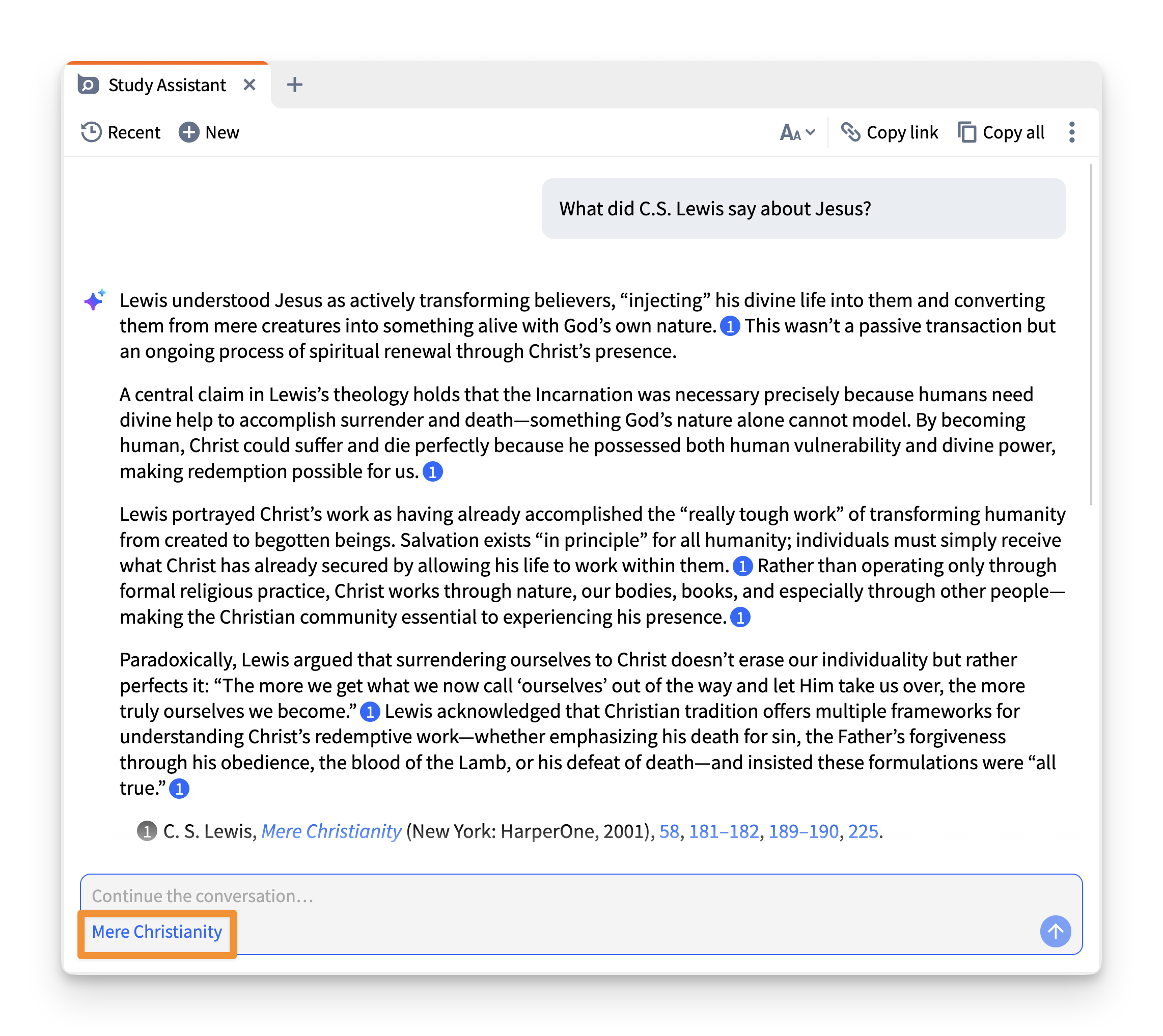
Whether you want to search a specific commentary, a custom theological collection you built, or a favorite author, the picker lets you easily choose from your saved collections or available resources. Once you make a choice, Study Assistant remembers it throughout your conversation, keeping your results consistent and relevant. For instance:
- Ask “What is the chief end of man?” and select a book you own to see the answer it presents.
- Expand “Type” and select “Systematic Theology” (or “Sermons” or “Grammar” or any other type of resource) to search within just your systematic theologies. “What is the hypostatic union?”
- Enter “Subject:Mark” (or any other subject tags) to search just resources on the Gospel of Mark. “What is the meaning of the cross in Mark?”
- Or expand “Collection” and select one of your own custom collections to search just within that collection.
If you’ve never created a custom collection before, follow these instructions. (You’ll need to have the desktop app installed.) If you run into any issues, ask our community! We’d love to help. For instance:
- Are you preaching or studying through Romans? Build a custom collection of all your favorite commentaries and resources on Romans. Then ask Study Assistant whenever you have a specific question on a passage in Romans. “How do interpreters understand ‘works of the law’ in Paul?”
- Looking for help in counseling? Create a custom collection of your counseling resources (e.g., use “subject:counseling OR tag:counseling”). “Is anxiety always sinful?”
- Need illustrations? Create an illustrations collection (e.g., use “subject:illustration OR tag:illustrations OR tag:quotes OR tag:quotations”). “What is a good illustration for trusting God amidst doubt?”
Once you set up collections, you’ll be able to use them as often as you want without needing to fiddle with them again.

Those not subscribed will get a limited number of Study Assistant uses per month.
2. Share your “Aha!” moments using Conversation Sharing
Have you ever had a breakthrough moment in Study Assistant that you immediately wanted to send to a friend, co-pastor, or study group? Now you can. This addition allows you to easily share any conversation thread, even with someone who’s never heard of Logos before.
Let’s say your friend is struggling. Feeling worthless. You only have two minutes before you leave to pick up your kids.
- You ask Study Assistant. “How is every single Christian of utmost worth to the Creator? How does God view his children?”
- Click the “Copy link” button.
- Share that link with confidence that the answer comes from reliable resources.
- And still have time to pray for them.
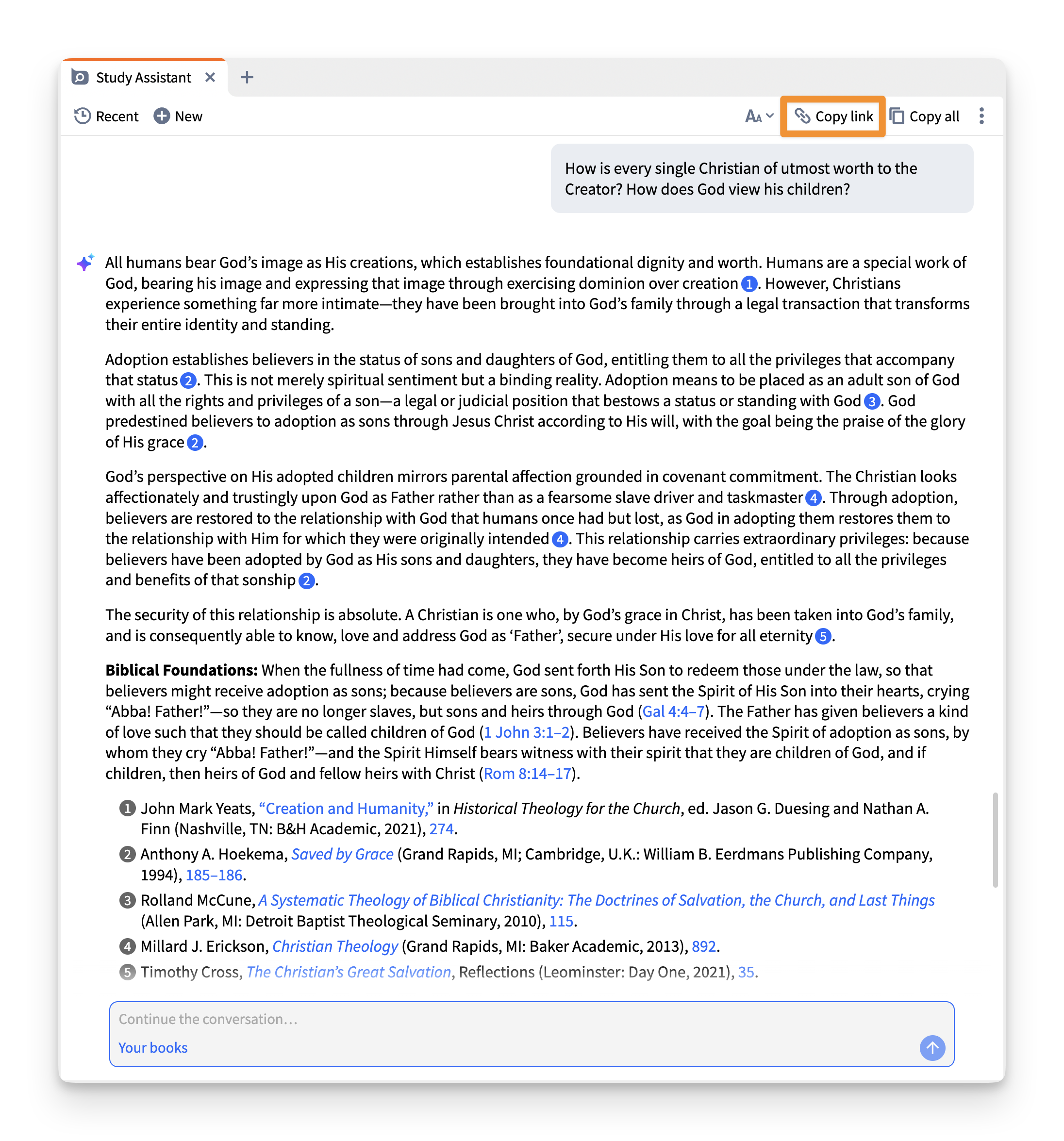
By clicking the “Copy link” button, you create a secure link that acts as a static snapshot of the conversation at that moment. When your friend opens the link, they will see the conversation exactly as it was at that moment. They don’t need to be a Logos user or have the app downloaded.
The best part? They can continue the conversation from their end, asking follow-up questions that draw them deeper into God’s Word.
Subscribe to any plan to get Study Assistant.

Those not subscribed will get a limited number of Study Assistant uses per month.
3. Bring past insights to your current reading (now on Android)
You put a lot of thought and prayer into what you study and teach. Now you can reap the benefits of that hard work right from your phone. Sermon & Bible study markers have come to the Android app.
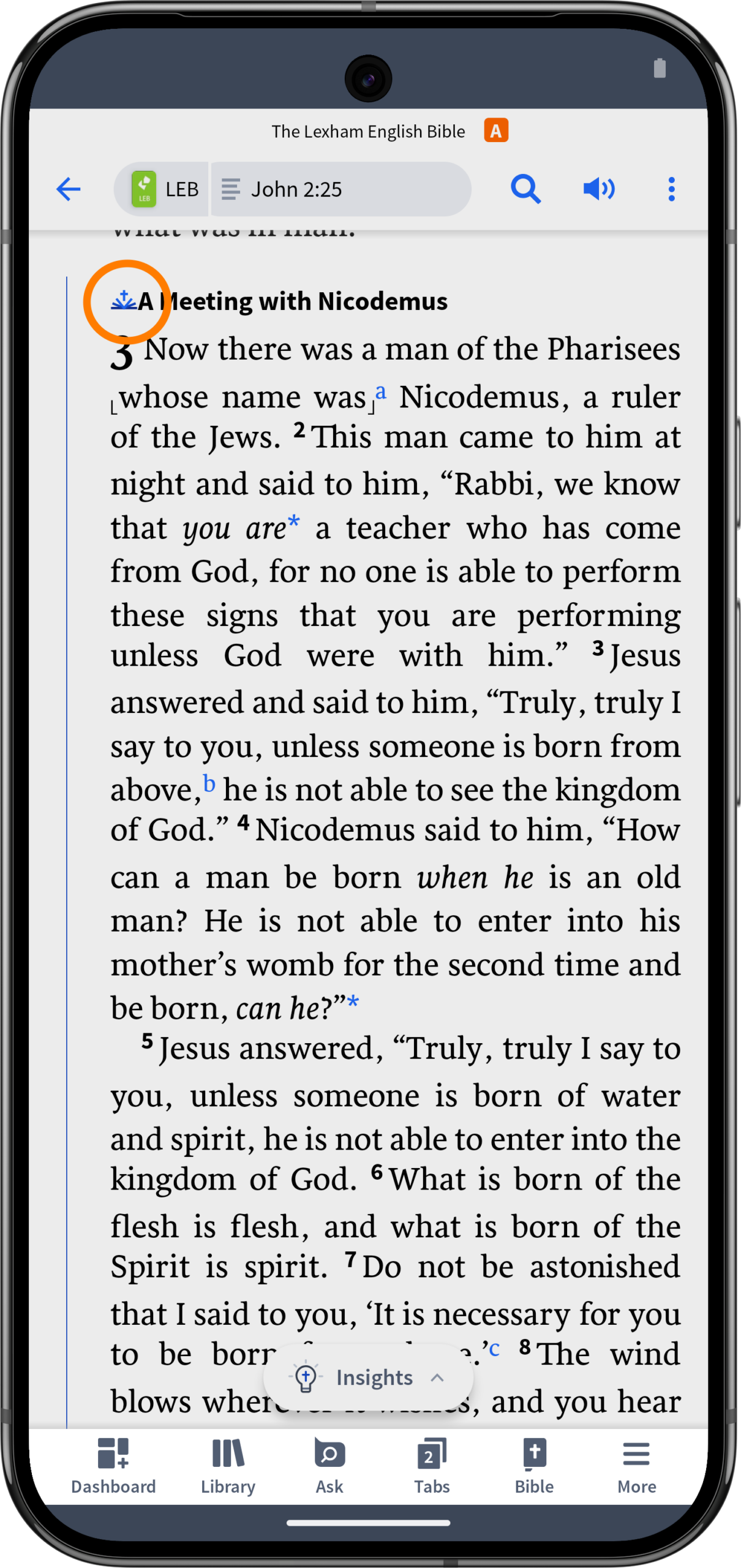
This feature adds clickable icons and margin ribbons in your Bible wherever your existing Sermons or Bible Study documents are tagged to a passage. Say you’re reading through John 3 on your phone. You happen to have preached on it five years ago. An icon appears—simply tap it to open the full sermon. Your past work, right there in the text, exactly when it’s relevant.

More updates
You can now reach Study Assistant more simply from the mobile app. It will appear with an Ask label at the bottom of your screen when you’re in a tab. Of course, you can still find it on the Dashboard, too.
And we’re constantly expanding the rich data available in Logos. For our Logos Max and Verbum Pro and Max users, version 49 introduces three powerful new dataset expansions for the Greek Deuterocanon:
- Commands: Find every type of command in the Greek Deuterocanon along with an analysis of its verb class.
- Promises: Find all the recorded promises, each annotated with a theme, a verb class, and an event that fulfills the promise.
- Questions: Discover every type of question along with an analysis of each question’s rhetorical nature.
Want to see all the under-the-hood updates and bug fixes? Take a look at the technical release notes.
How do you update to the latest version?
That question has come up in our What’s New demos. Watch below for the answer and save your spot for a walkthrough of these updates (and more) at the next demo.
We want to hear from you!
Have ideas for how we can build a product you’ll love? Share your suggestion and you might see it in a future update!
Connect with us
Join 500K+ others and connect with us to be first to know about the latest releases and promotions from Logos:
We’d love to host you for free live training and show you how you can get the most out of Logos.
Subscribe to stay in the know about future updates.


