
 Logos Staff
We’ve made incredible progress this year—so much so that we had to celebrate. But we’re not done yet! The second-to-last release of 2025 brings a new feature and updates to help you study deeper and faster, year after year.
Highlights at a glance
Watch the demo
1. Find answers in your Logos library like never before with Study Assistant
One customer called it “the single greatest addition to Logos in 13 years.” Why? Study Assistant (in Premium and up) unlocks Bible study and research in a conversational format. Ask a question about the Bible, theology, church history, and more—then a follow-up, then another, and on and on.
When you ask about a passage, topic, or doctrine, Study Assistant searches your Logos library, synthesizes the findings, and gives you a clear, cited answer—complete with inline references you can open to see their full context. You can ask clarifying questions, narrow the focus, or click into the cited books to go deeper.
Subscribed? Try it out.
Since all answers come from reputable Logos resources, this means Logos AI isn’t making things up, and you can verify that for yourself. Citations take you not only to the right book or article or page, but to the exact content Logos AI pulled from.
Pastors and scholars can use it like a research assistant. Those new to study can get reliable answers to their Bible questions.
I’ve found Study Assistant really helpful because it’s flexible and intuitive (like a normal conversation, where I can ask clarifying questions, go on rabbit trails, etc.), but every answer points me back to Scripture or a trusted theological resource. I like that it shows me exactly where the response comes from, so I can check it out for myself. And it often uses content from books I don’t own yet, which has helped me discover some great new resources.
—Ronny Woods, Developer & Logos User
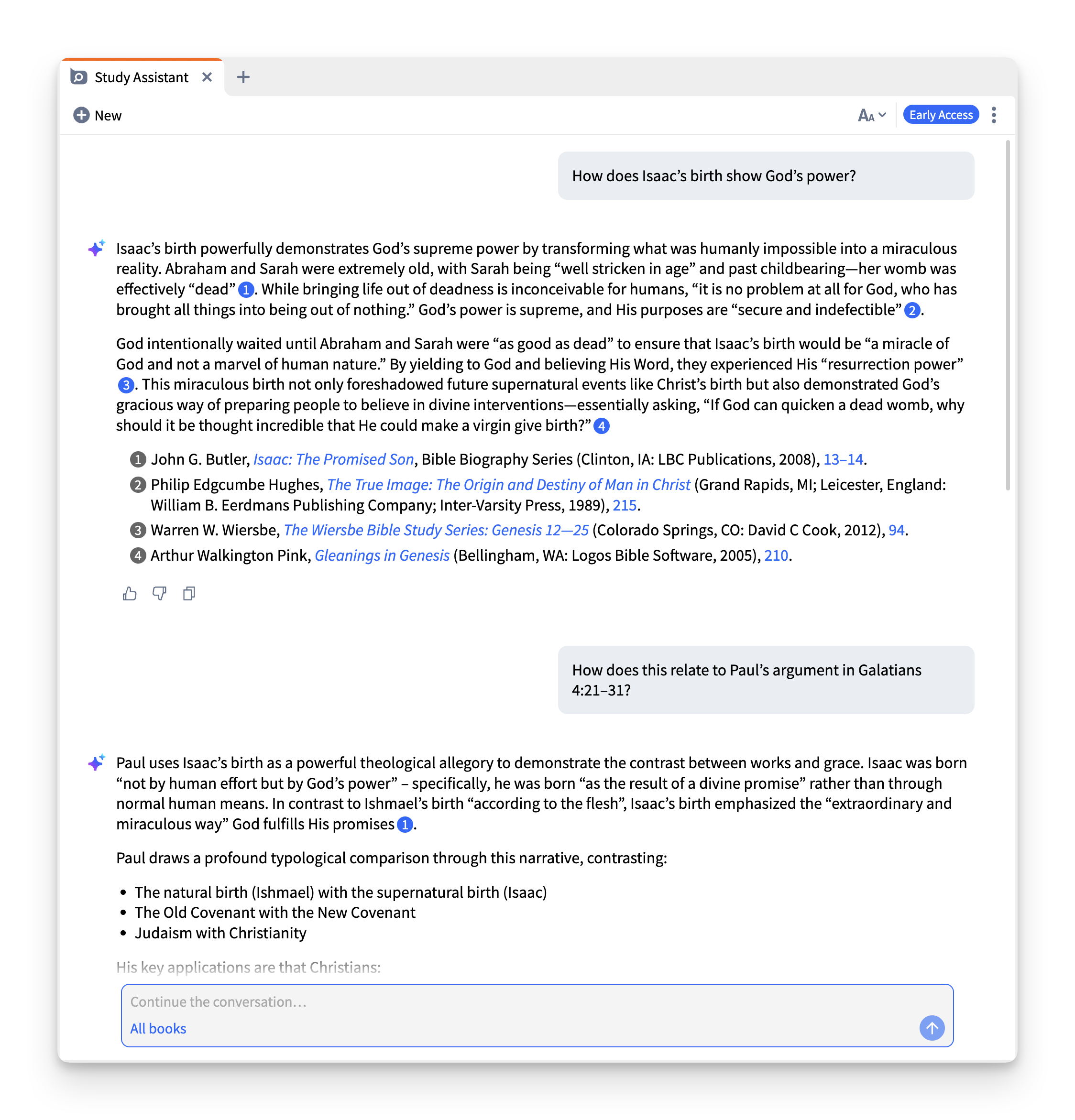
Logos users have been loving it, but don’t take our word for it.
I have been using the new Study Assistant and it HAS to be the single greatest addition to Logos in the 13 or so years I’ve used it. What a blessing that it uses my resources but makes it SO easy to find good answers. It has already been a huge help and will probably by my primary “second window” next to the Bible. I just wanted to let you all know you’ve done a wonderful thing with this and I’m really excited about it.
I have just been able to spend some time with the new Logos Study Assistant and felt the need to write to express my delight and excitement with this new feature. This is probably the most significant addition to features that I’ve seen in my time with Logos that has spanned over a decade, and that is no slight on previous updates. To get to learn through a chatbot that is tied directly into my library? I can’t even think of anything I would benefit from in a greater way. Thank you for taking the time to add this feature. I’m very excited to incorporate its use into my regular study and sermon prep.
You can get to Study Assistant from the Tools menu, Factbook, or a Smart Search synopsis. Here’s a step-by-step guide on how to use it, including how to tell the Study Assistant to use the entire Logos catalog or restrict its scope to books in your library.
If you’re already subscribed, try it out!

2. Stay curious with Factbook’s new questions section
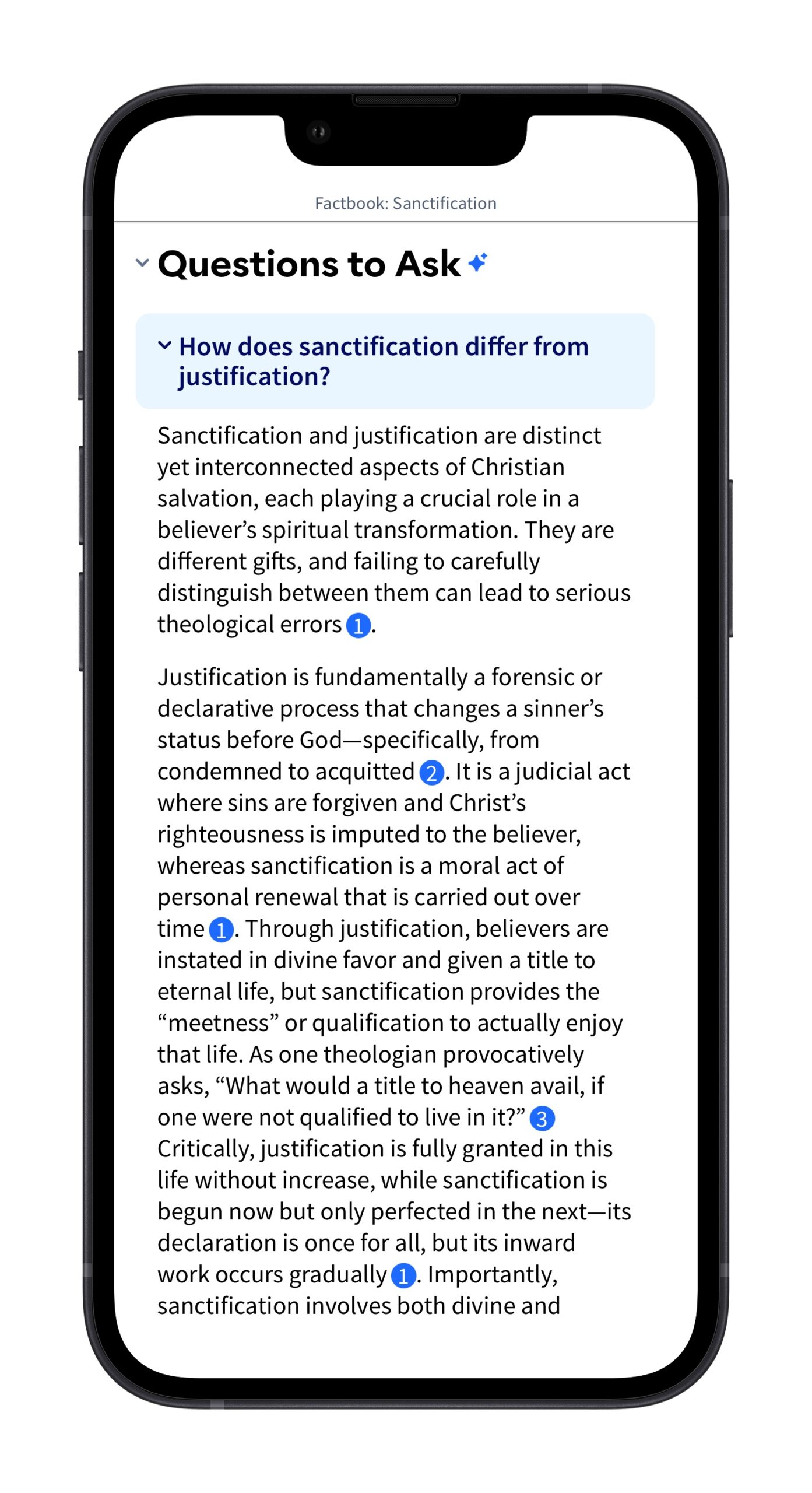
When you open a topic in Factbook, you’ll now see questions to spark deeper exploration, like: What does this passage teach about faith? or How have theologians understood this concept over time?
Click any question to see an answer (with citations), or jump into Study Assistant to keep the conversation going.


3. A smarter home for study on the go
When you open the mobile app’s Dashboard, what you see will now look much more like the web app and desktop app. You’ll find it easier to discover new features, get personalized study prompts, and stay connected to what’s happening at Logos.
Plus, have you ever been using the mobile app and wondered when to use Topic Guide and when to use Factbook? Now all the Topic Guide content is available in Factbook, so you can start your topical study there every time.

More updates
Want to dig in beyond the highlights? See more in the technical release notes.
We want to hear from you!
Have ideas for how we can build a product you’ll love? Share your suggestions and you might see it in a future update!
Connect with us
Join 500K+ others and connect with us to be first to know about the latest releases and promotions from Logos:
We’d love to host you for a free live training webinar and show you how you can get the most out of Logos.
Subscribe to stay in the know about future updates.


